
Contents (8 sections)
Every server produces logs. As long as they stay on the machine, they serve only one purpose: understanding after the fact, provided the attacker has not bothered to erase them. A SIEM moves these logs out of reach, correlates them, and turns lines into questions you can answer: was this SSH key added by us? Did this banned address end up getting in? We integrated Wazuh across our entire fleet in September. Here is the setup, and above all what happened between installation and a tool that is actually readable.
Why now, and why Wazuh #
Three reasons lined up. The bastion had just centralised all access: its records deserved better than a local disk. Our ANSSI self-audit flagged centralised logging as a hygiene measure we did not cover, with a recommended retention of six months to a year. And the GDPR (Article 32) expects a hosting provider to be able to detect and document a breach, not just suffer it. Wazuh stood out because it is open source, complete (collection, detection, file integrity, compliance checks, response), and works with a lightweight agent on each machine. We deliberately stayed on the 4.x branch rather than the brand-new major version, which was not recommended for production at the time we chose.
Sizing: the three things the installer does not do #
A dedicated VM, 8 vCPUs, 16 GB of RAM, 250 GB, with two network interfaces: one on the internal network, one on the public block. Without the second, the thirty internal agents would go out through the gateway and all appear under the same address, in a tool whose job is precisely to say where everything comes from. The hypervisor firewall was written before the first boot (the trap of the firewall that is declared but does nothing), and no service is public apart from the port needed for certificate renewal; the console is restricted to two addresses. The automatic installer does the rest, except for three things we had to fix ourselves:
- The indexer memory is set to 1 GB whatever the machine’s RAM. On 16 GB, that is a machine that crawls, then stalls. Raised to 8 GB, with identical minimum and maximum bounds.
- No retention policy exists by default: indices grow indefinitely. We set twelve months for alerts and ninety days for technical indices, with automatic purging. Retention is a documented decision (GDPR register), not an accident caused by a full disk.
- Raw archives should be disabled: they keep every event, not just alerts, and blow up storage without proportionate investigative value.
38 agents in three waves, with a pilot first #
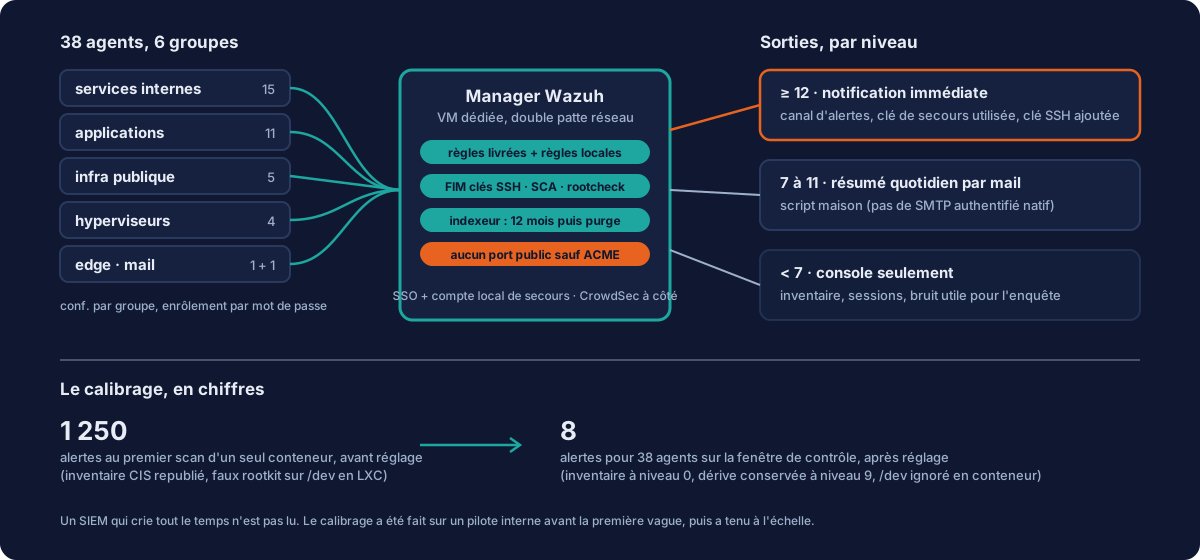
Before the first agent, the manager was prepared: six groups (internal services, applications, public infrastructure, hypervisors, edge, mail), because configuration is managed per group and putting everything in the default group makes it impossible to differentiate later. And an unpleasant discovery: enrolment required no password. Any machine on the internal network could register as an agent. Fixed before the first wave. The pilot was an internal container with nothing at stake for clients: a better choice than a production application for measuring what an agent really produces.
Tuning: from 1,250 alerts to 8 #
The pilot’s first scan, a single container, produced 1,250 alerts. Extrapolated to the 38 machines, that meant 47,000 alerts from enrolment alone, and a tool nobody would ever open again. Analysis by rule showed that the CIS compliance check accounted for only 30% of the noise. The real false positive came from rootcheck in containers: it takes an LXC container’s runtime files in /dev for signs of a rootkit, at level 7. About 2,500 empty alerts expected across our 26 containers.
Good practice is not to disable modules. The bundled rule set already separates state from drift: the rules that republish the compliance inventory at each scan were lowered to level 0, while those that report a check going from passed to failed stay at level 9. The compliance console is still fed, since its results live in a database separate from the alert index. Rootcheck on /dev was switched off for the groups containing containers, and only those: the nine public machines have a clean kernel and do not have this false positive. Measured result, full fleet: 8 alerts for 38 agents over the monitoring window, all from our own connections.
Three outputs, one threshold each #
A SIEM with no recipient is a disk filling up. Our doctrine rests on the threshold more than on the channel: level 12 and above, immediate notification in the team’s alert channel; 7 to 11, a daily summary by e-mail at seven in the morning; below that, console only. The summary required a home-made script, because Wazuh cannot do SMTP authentication and expects a local relay, which contradicts our policy of sending outgoing mail through an authenticated API. And each output was proven end to end with a temporary level 12 rule triggered by a fake log line, then removed: the recipe for testing an output without waiting for a real incident.
The detections that really matter #
- Any change to an
authorized_keysfile across the 38 machines, in real time, with the diff in the alert (level 14). It is the answer to “someone has gained a key somewhere”: the angle the bastion does not cover. - Use of the offline emergency key, recognised by its fingerprint in a successful authentication: level 15, the maximum. It must never be used without us knowing.
- Compliance of that emergency key, through a home-made verification policy: the public machines must carry it, the internal containers must not. A dedicated dashboard shows the state of each machine, updated every hour.
- CrowdSec correlation: banned address followed by a successful SSH login, level 13.
Two-layer SSO, and a local account that stays #
The console is connected to our identity provider, but Wazuh has two authorisation layers: the indexer’s role mapping, and the manager API’s access control, because the dashboard passes on the user’s context. Without a rule in the second, you are logged in and the application is empty, with a generic error. And the mapping file on disk does nothing until it is pushed into the security index: check through the API, never by reading the YAML. The local administration account stays active alongside SSO: never SSO-only access on a SIEM, it is the tool you open when everything else is going wrong.
What remains open #
We say it because it is true: the SIEM VM does not yet have storage replication between nodes, so its recovery depends on the backup, with a possible lag. Agent deployment was done by hand in three waves and must become an automation role so that every new host is enrolled without anyone having to think about it (see our machine life cycle). Machines rented to clients who administer them themselves are out of scope, by choice. And the question every SIEM ends up asking remains ours: who reads the alerts. The threshold and the daily summary are our answer; they will be adjusted with use.
Detecting a key added in the middle of the night, replaying an access, proving twelve months of logs to an auditor: that is concretely what our managed services cover beyond hosting. If your logs never leave the machine that produces them, let us talk.