

Case study · client application

A management platform for a dance association, from the public website to the admin area.

Members, seasons, registrations, membership fees, timetable, workshops and teachers' accounts, all kept in one place by volunteers. The association is not named. The screens are real, the identities fictitious.

01/BackgroundWhere we started

An association of this size is already a small business

Weekly classes, workshops, social evenings, a season running from September to August. For each situation as it was before, what the platform does.

  1. 01The website showed embedded payment forms, one per class, with no link between them; no business data existed.The server is the single source: catalogue, basket, registrations, payments. HelloAsso goes back to being one payment method among others.
  2. 02Knowing who had paid their membership fee meant cross-checking two exports.One record per member, a compulsory annual membership to register, active once paid; the list can be filtered by status.
  3. 03A partner dance class fills up on both sides, and the balance between leaders and follows was kept by hand.Each role has its own capacity, places left and waiting list; a class can be open on one side and closed on the other.
  4. 04Answering a request about personal data left no dated proof.A consent register that cannot be rewritten, supporting documents destroyed once a decision is made, a log of every action.
02/What we builtDelivered so far

A platform for every role in the association

Treasurer, secretary, teacher, DJ, member: each person sees their own scope, and what they have to do.

  • 01
    Members and fees. Member record, history of seasons, membership card issued on payment, reactivation in one click.
  • 02
    Registrations. Public sign-up flow with login by a code received by e-mail, linked couple registrations, price fixed at creation, waiting lists by role.
  • 03
    Payments. Orders, card payment through HelloAsso or manual entry, amounts due, numbered PDF certificates, accounting exports.
  • 04
    Timetable. Sessions generated from the class slot, holidays removed, moves and cancellations, personal calendar subscription.
  • 05
    Workshops and events. Workshops by level, the same per-role capacity limits, sales open or closed, takings net of refunds.
  • 06
    Teachers' kitties. A ledger for each teacher, credited per session, debited against receipts, available on a self-service basis.
  • 07
    Team and communication. Shared documents with calculated access, targeted announcements, a newsletter confirmed by the person themselves.
  • 08
    Redesigned admin area. A “To do” dashboard, menu filtered by permissions, component kit, dark theme, usable on a phone.
03/Four screensValidation environment, fictitious identities

Four screens, actual size

Screenshots of our validation environment: a copy of production run through an anonymiser, hence fictitious identities and addresses. The association's name, its venues, its teachers and its amounts are replaced in the page before the screenshot; nothing is blurred afterwards.

Admin area dashboard: the week's sessions, queue of requests to handle and system status
Screen 01The committee's dashboard, light theme. Association name replaced, fictitious identities.

A dashboard that says what to do

The coming week first, then the “To do” queue: subscriptions to approve, refunds to pay, receipts to check, from the most urgent to the oldest. The bell and the menu show the same count.

Subscriptions screen: leader and follow capacity per class, statuses open, closed or waiting list
Screen 02The season's subscriptions. Class names and amounts replaced. On a phone, the table of classes.

Two capacity limits per class, one status per role

This is the constraint specific to partner dancing. A class can be closed to leaders and open to follows on the same evening; the balance of roles for the whole season is shown at the top.

Monthly timetable: sessions coloured by class, cancelled or moved sessions, holidays hatched
Screen 03One month's timetable. Teachers' first names fictitious. On a phone, Monday to Friday.

Sessions are generated, then live their own life

From a class slot, the system creates the season's sessions, leaving out the holidays. Each one can be moved or cancelled with a reason, and the member's personal calendar updates itself.
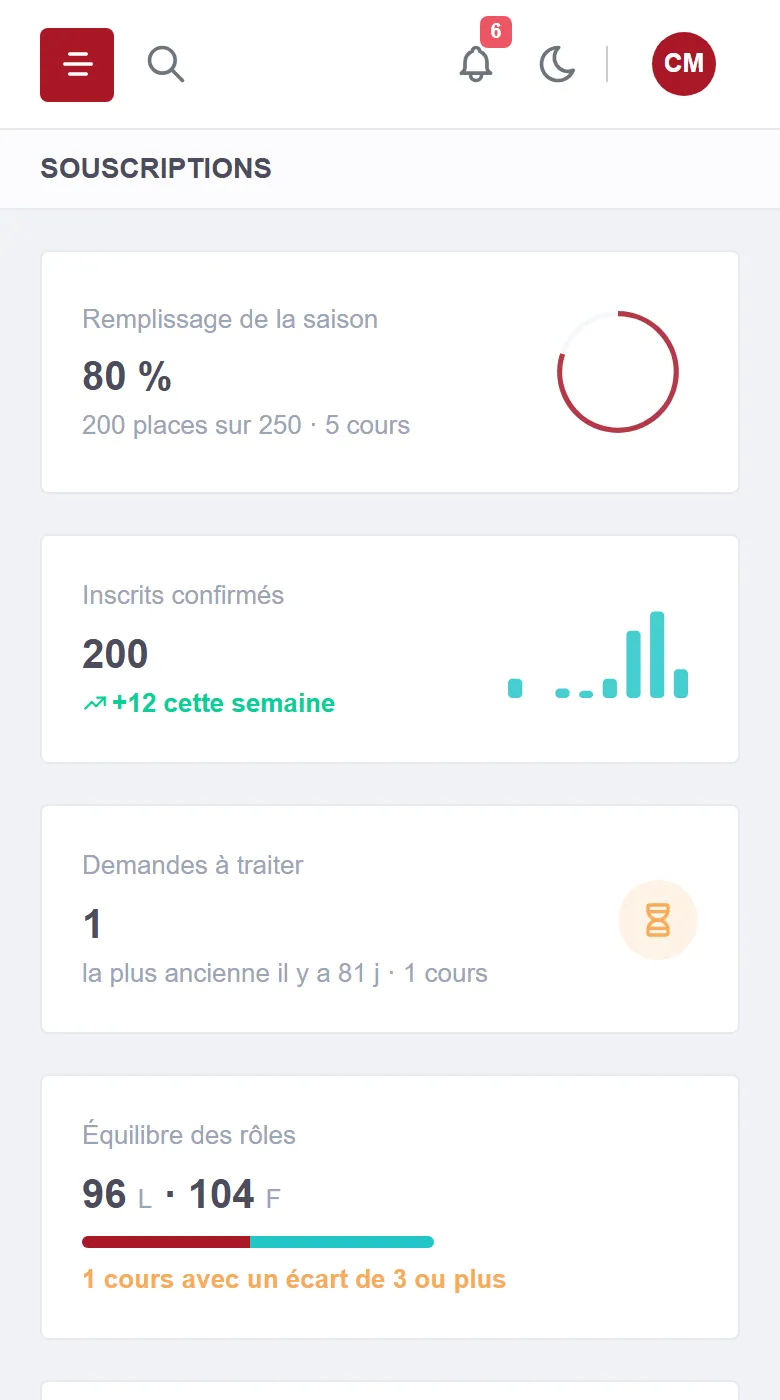
Subscriptions screen on a phone: indicators stacked as cards
Screen 04The same subscriptions screen on a phone. Data from the validation environment.

On a phone, for volunteers who drop in briefly

Indicators stack up, tables scroll sideways, and the app installs from the browser. It keeps nothing offline: permissions and data are checked again on every request.

04/TechnologiesWhat we chose, and why

Three components, a single source of truth

The public website, the admin area and the API are deployed separately; only the API talks to the database.

  • InterfacesPublic website and admin area in Next.js; the browser never talks to the API, the admin area relays on the server side.
  • Server.NET 10 API in layers; dependencies only point inwards, and tests fail if a layer oversteps.
  • DatabasePostgreSQL, versioned migrations applied at start-up; integration tests on a real database, never on a mock.
  • Permissions and traceabilityViewing and acting kept separate for each area; automatic audit log; immediate revocation of an account.
  • AIA model on our own infrastructure by default, interchangeable providers, a quota per account per day, a trace of every call.
  • Hosting and deliveryThree Docker images built on our forge, an isolated validation stack, manual promotion to production; hosted and looked after by us, in France.

What next

An activity running on spreadsheets and forms side by side?

This platform grew out of a specific line of work and its rules. Tell us about yours, and we will tell you what is feasible, with a timeline and a rough price.

Discuss your project

Reply within 24 working hours, from one of the two founders. Or by phone: +33 7 59 96 14 99.