
Contents (7 sections)
An SSH client is the tool an administrator opens most often in a day. For years ours was Termius: good-looking, synchronised between workstation and phone, with folders, shared credentials and a library of commands. In September we replaced it with Termix, an open-source web console hosted on our own administration network. This is not a story about features: Termius has more. It is a story about who holds what.
What you entrust to a SaaS SSH client #
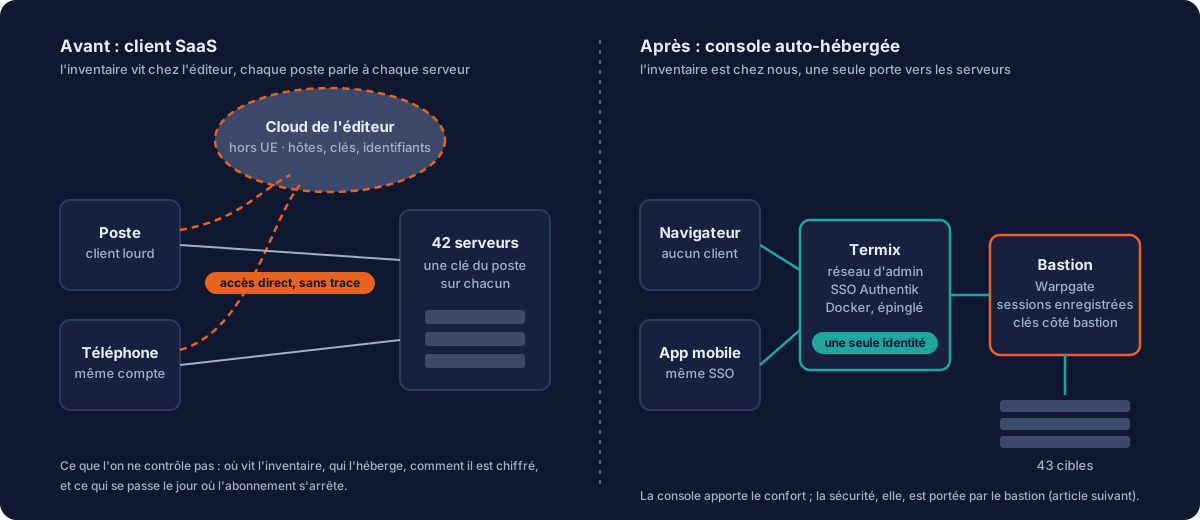
Look at what your SSH client contains: the complete list of your machines, with their addresses, ports and accounts. Your private keys, if you accepted synchronisation. Your passwords, your command snippets, sometimes your tunnels. It is, word for word, the map of your information system and the means of getting into it. With a SaaS vendor, all of this is encrypted and synchronised through its servers, outside the European Union, under a subscription. We have no reason to doubt the quality of that encryption. But we had no way of verifying it, no control over where it lived, and one more dependency for the day the subscription, the vendor or its policy changes. For a fleet we bill to clients as hosted and administered in France, it was an inconsistency we had been carrying for too long.
Termix: a web console, on our own servers #
Termix (Termix-SSH/Termix) is a self-hosted web platform: multi-tab SSH terminal, file manager, tunnels, remote desktop through Guacamole, Docker integration, session recording, and a mobile app. All of it in a container, pinned to a specific version, with a SQLite database encrypted at rest. We installed it on a small Debian 13 VM on our administration network, with two principles: no local passwords (authentication only through our Authentik identity provider, the twelfth service connected to it) and no key that opens the servers directly (more on that below).
Populating 42 hosts without typing them: the API, and the right source #
Copying 42 entries by hand is the best way to introduce errors. So we imported the inventory through the Termix API, in two passes: first the jump host (the 26 machines on the internal network go through it), then the clients of that jump host, because an entry can only reference a jump host that already exists. Folders per zone, one shared credential, and one essential setting: the username on the entry must take precedence over the one in the credential, otherwise the whole fleet connects as root when it actually mixes four different accounts.
First lesson, and it has nothing to do with Termix: the import was built on what the cluster declares (the hypervisor API), not on our inventory file. Just as well: the file contained four machines that no longer existed, an address assigned to the wrong VM and two struck-out historical entries. To populate a tool, always start from the source of truth, never from the document that is supposed to reflect it.
The pitfalls the documentation does not mention #
- TLS is not optional. Without
ENABLE_SSL=true, the password travels in clear text and the default CORS configuration is very permissive. The documentation lists it as a known weakness; nobody reads it before the incident. - Encryption is derived from the user’s password. Resetting a password outside a session destroys all the encrypted data of that account. Corollary: never create a colleague’s account on their behalf.
- The environment file is created with 644 permissions with the JWT secret and the database key inside. Set it back to 600 by hand. And a daily usage signal is sent to the vendor by default, which can be disabled in the settings.
- The listing route is singular (
/host/db/host); the official example gives the plural, which returns 404. Worse:/hostsreturns the web application with a 200. Check the content type, never the status code alone. - A bulk update replies “43 updated, 0 failed” while changing nothing if the field is not on its allowlist. Never trust that return code: re-read the entry.
- Session recording cannot be disabled in the version we use: the per-host switch exists in the documentation, not in the route code. We live with it, with minimum retention. Bug reported upstream.
The trap that nearly drowned the bastion #
Termix periodically checks that each host responds, by opening a TCP connection and closing it again. Harmless against an ordinary SSH server. But our entries no longer point at the servers: they point at our bastion, which records every connection. Forty entries probed every sixty seconds means about 5,200 ghost sessions a day, 1.7 GB of recordings daily, and an audit trail drowned in noise indistinguishable from real connections. The global setting can only slow the probing down (capped at one hour), not switch it off. It has to be turned off entry by entry, then the service restarted, because updating an entry does not reload the timers.
// PUT /host/db/host/:id - set on every entry, then restart Termix
{ "statsConfig": {
    "statusCheckEnabled": false,
    "metricsEnabled": false,
    "disableTcpPing": true
} }
SSO: two surprises #
The link with the identity provider is made through environment variables, with automatic registration at first login and the administrator role granted by group membership. Two surprises. The first: the callback URL is built from the request’s Host header. Reach the console through an address other than the one declared to the identity provider, and login fails with a 400. The second, more serious: the list of authorised users does not apply to the very first account. The first person to complete an SSO login becomes administrator, whatever the allowlist. The only real barrier is therefore the application assignment on the identity provider side: never widen it before your own first login.
What the console is not #
Let us be clear: Termix brings comfort, not security. A web console holding a key that opens 42 machines is a very high-value target, and that is exactly what we had in the first few days. The consolidation came from elsewhere: all entries were repointed to our Warpgate bastion, and the Termix key was removed from the 42 servers. It is now only used to present itself to the bastion; it is the bastion’s keys that open the machines, and every session is recorded there. The console could disappear tomorrow; nothing that matters lives in it. That is the subject of the next article.
Taking back control of your administration tooling is part of what we mean by sovereign managed services: not just hosting in France, but knowing at all times where the map of your information system lives. If yours is in the cloud of an SSH client, let us talk.