Contents (15 sections)
- The attack: your form is the weapon, not the target
- Without an access log, there is no investigation
- Timeline of a campaign
- Anatomy of the bot: a real browser lying about its name
- Why the classic defences saw nothing
- The countermeasure: take the weapon away
- Instrument rather than interpret
- Typing time, measured with a trusted clock
- The decoy field
- The inconsistent browser, read through period markers
- The image beacon: observe a presence rather than an absence
- What we did not do, and why
- What comes next
- The checklist if you have a double opt-in form
- The final word
One Tuesday morning, while reading through the logs of a site we host, one figure did not add up: thirteen newsletter sign-ups overnight, for a site that gets two or three a week. None had been confirmed. All carried addresses that had never set foot on the site: Gmail, Yahoo, Hotmail and mail.ru mailboxes, the domain of an American company. The site was not being attacked: it was being used. Here is what we found by going back through the logs, what we understood about the bot on the other side, and why the defence that finally held is not the one you put in place first.
The attack: your form is the weapon, not the target #
The mechanism has a name (subscription bombing or list bombing) and an OWASP entry (OAT-017, Spamming). The attacker wants nothing from your site. What they want is the confirmation e-mail your site sends when someone signs up. They take the address of their victim (someone whose bank account they have hacked, or whom they want to drown) and sign it up on hundreds of double opt-in sites. Each site sends a single polite e-mail, believes itself beyond reproach, and has technically done nothing wrong. It is the sum that overwhelms: several hundred “Confirm your subscription” messages in an hour, among which the bank’s alert goes unnoticed.
The consequences for the relay site are real and invisible: every unsolicited e-mail goes out from your domain, signed with your DKIM key. Recipients click “report as spam”. Your sender reputation drops with Gmail and Microsoft, and one day your real e-mails (invoices, order confirmations) land in junk folders without you understanding why. The complaint threshold beyond which Gmail starts penalising you is 0.3%. Fourteen unsolicited e-mails on a list of a few hundred addresses already puts you there.
Without an access log, there is no investigation #
A first, slightly embarrassing finding: when the first signal appeared (two days earlier, on the contact form), we had no HTTP log on that machine. Traefik does not enable it by default. We had the business table (who submitted what, when), nothing more: no way of knowing how many times the bot had loaded the page, whether it had requested the anti-spam challenge, whether it loaded the JavaScript. So the first action was to enable the access log in JSON format, with rotation, and to discover along the way that neither cron nor logrotate existed on this VPS, a trap we had already met on our hypervisors.
# traefik.yml - JSON access log, headers dropped except User-Agent
accessLog:
  filePath: /var/log/traefik/access.log
  format: json
  fields:
    headers:
      defaultMode: drop
      names:
        User-Agent: keep
Everything that follows comes from that file. Forty-eight hours of logs, ~220 MB a day (vulnerability scanners weigh heavily), 45% of requests in error: the normal background noise of a public IP address. And, in the middle of it, two quite distinct bots.
Timeline of a campaign #
- D-2, 11 am → midnight. Six submissions on the contact form, from Tor exit nodes. Gibberish messages, Gmail addresses with dots inserted at random. It is not the message the bot cares about: it is the acknowledgement of receipt the form sent back to the address entered. The contact form was an open relay.
- D-1, daytime. Acknowledgement removed (the form now only writes to the office), content filter, cap on e-mails per recipient, HTTP log. The contact bot comes back eleven times in the evening: eleven times classified as spam, zero e-mails. That vector is closed.
- D-1, 5.34 pm. A “residential” address (more on that later) loads the site, requests an anti-spam challenge on the newsletter banner… and submits nothing. Reconnaissance. It identifies the form, the type of captcha, the expected response.
- D-1, 8.17 pm → D, 9.18 am. Twenty newsletter submissions, one every ten to thirty minutes, from eight different IP addresses spread over two /16 blocks announced by a large European telecoms operator, but sub-allocated by /22 to a third party with an exotic registry country: the fingerprint of a rented residential proxy pool. Widening the search, forty-five addresses from these two blocks visited the site in forty-three hours, at a thousand requests an hour, a third of total traffic. Fourteen confirmation e-mails go out to strangers. Five are blocked by the cap, because the bot reused an address.
- D, 9.30 am. The airlock is deployed (we will come to it). The bot keeps knocking. It no longer gets anything.
Anatomy of the bot: a real browser lying about its name #
The question you ask straight away: is it a script calling the API, or a browser? The answer lies in the volume and nature of the requests. A direct call to the form endpoint would take three requests: get a challenge, solve it, post. Each bot session makes sixty to seventy, and they are requests a script has no reason (and no means) to produce.
20:17:16  GET  /                                     home page
20:17:16  GET  /_next/static/chunks/…js   ×18          JS and CSS bundles
20:17:17  GET  /api/cours-statut                     called by a useEffect on the page
20:17:17  GET  /tarifs?_rsc=5CB68i4…      ┐
20:17:17  GET  /planning?_rsc=5CB68i4…    │  41 prefetches in < 1 s,
20:17:17  GET  /contact?_rsc=5CB68i4…     │  with TWO different _rsc tokens
   …      GET  /…?_rsc=tXyZJ52U…          ┘
20:17:19  GET  /api/altcha/challenge                 issued by the anti-spam widget
20:17:21  POST /api/newsletter                       proof of work solved, valid
Four clues, in decreasing order of strength. The ?_rsc= prefetches first: the Next.js client router prefetches the pages of visible links by requesting their React Server Components payload, with a token the runtime generates itself from the component tree. We see forty-one of them, with two tokens (two layout trees), in the exact order Next emits them. A script knows neither this mechanism nor these tokens. The anti-spam challenge next: it is requested by the <altcha-widget> element once mounted (on this banner, only when the e-mail field gets focus), and the solution submitted is cryptographically valid. The bundles in /_next/static/, useless to anything that does not render the page. And /api/cours-statut, called by a useEffect: the contact form bot, which crawls twenty pages after posting, triggers it on each one, at the right moment, and only where the page code calls it.
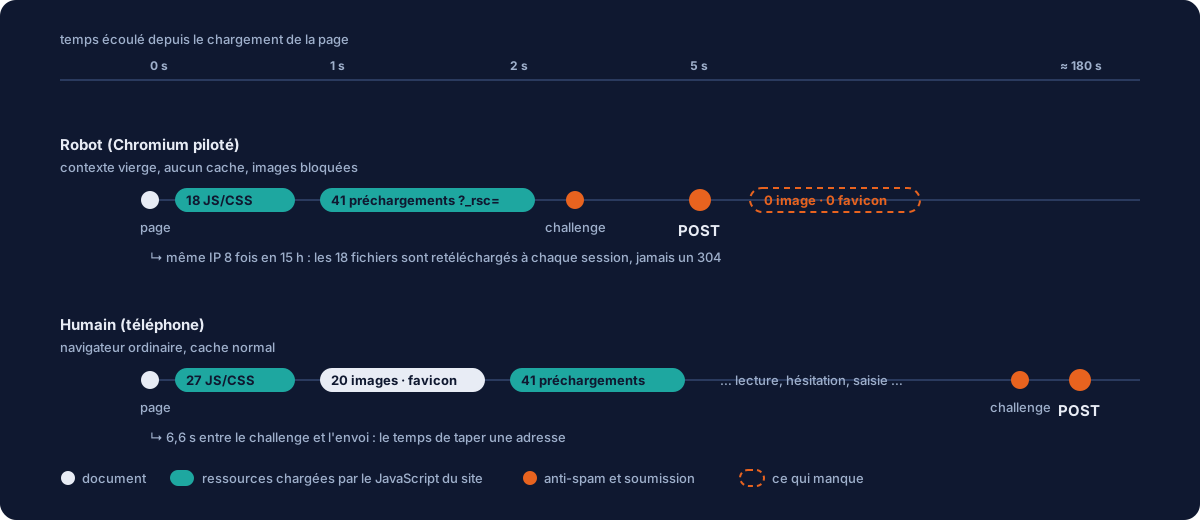
Then we compare with the only two humans in the period: a visitor on an iPhone, and the site administrator on Firefox. The picture is unequivocal.
- Zero images across the five bot sessions, sixteen to twenty in the two human ones. Beware of jumping to conclusions: a headless browser loads images by default (Playwright screenshots work because of it). Zero images means the script is deliberately blocking them (
page.route('**/*.{png,jpg,webp}', r => r.abort())), the number one optimisation of any scraper. It is the attacker’s choice, and therefore a telling trait. - Zero favicons. Chromium’s old headless mode (and the
chromium-headless-shellthat Playwright has used by default since version 1.49) never requests the favicon; the new headless mode (the only one left since Chrome 132, the one Puppeteer uses) requests it, to the point that users complain about it as a bug. That tips the balance towards Playwright, without proving it: both tools leave the same HTTP fingerprint. - No cache from one session to the next. The same IP address came back eight times in fifteen hours and downloaded the eighteen JavaScript files again every time, without a single 304. That is the signature of one
browser.newContext()per round: a blank context, empty cookies, empty cache. - HTTP/2 and TLS 1.3 everywhere. The network stack of a real Chromium. A
python-requestsclient would speak HTTP/1.1. - A User-Agent that lies. “MSIE 6.0”, “AOL 9.5 / Windows 98”, “PPC Mac OS X”, “Arora/0.4 on WebKit 523”, drawn at random from a list, different for each session. A 2005 browser cannot run Next.js or solve a proof of work in a Web Worker. It is a real Chromium lying about its name, not a script imitating a Chromium.
One last detail, more telling than all the rest: the bot fumbles. Its first three submissions arrive 1.5 seconds after the challenge. Then, during the night, it moves to fourteen, eighteen seconds: a “humanised” delay added on the fly. The next morning, it drops back to 0.9 seconds. It has received no feedback telling it what works, so it experiments. Remember this point: we never told it anything, and that is exactly why it keeps burning its IP addresses for nothing.
Why the classic defences saw nothing #
The site was not unprotected. It had a proof-of-work captcha (ALTCHA, whose choice we explained here), a per-recipient e-mail cap, per-IP rate limiting, and CrowdSec in observation mode. Each of these layers was bypassed, not through cunning, but because none of them was designed for this form of attack.
- Proof of work is a volume barrier: it makes ten thousand submissions a minute expensive. It does nothing against one submission every twenty minutes, and a remote-controlled browser solves the puzzle exactly as yours does. Raising the computation cost would only punish your visitors; the bot has time.
- The per-recipient cap (one confirmation e-mail per address per 24 hours) protects a given victim against repetition. The bot uses a different address each time. It only blocked its five repeats.
- Per-IP rate limiting (five requests per quarter of an hour) assumes the attacker comes from one place. They come from eight, with one request each.
- CrowdSec looks for scans, exploitation attempts, brute force. It saw 115 alerts in seventeen hours (all genuine scanners) and zero on the bot’s eight addresses. A clean
POSTanswered with a 200, once per IP, looks like nothing it knows. Its community list of 17,000 addresses contained none of the eight: residential addresses never reported.
The countermeasure: take the weapon away #
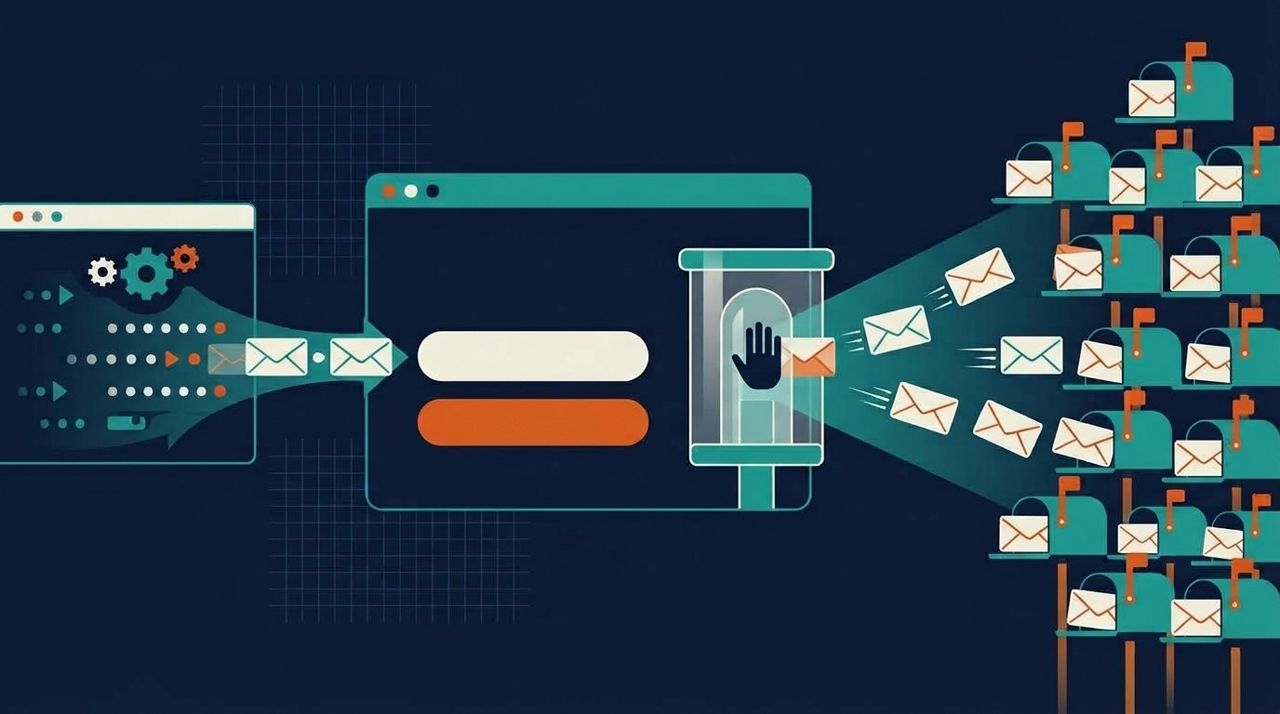
We chose the third. Since that morning, a sign-up from the public form no longer sends any e-mail. It is recorded in an intermediate state (“to be validated”) with every trace the submission left, and it is a person in the office who decides, from the back office, to release the confirmation e-mail. Two non-negotiable rules in this design:
- The person in the office never confirms on the visitor’s behalf. They only trigger the sending. It is always the recipient’s click on the link that counts as consent, so the GDPR evidence remains intact. A confirmation token is worthless until the e-mail has gone out: if it shows up before, it has leaked.
- The HTTP response does not change. The bot receives the same
202 Acceptedas before. Nothing tells it that it is in an airlock. See above: an attacker without feedback adapts nothing.
// Sign-up handler (excerpt). The mode is a setting, not a rewrite:
// Newsletter__ValidationManuelle=false restores immediate sending under the cap.
sub.RenseignerSignaux(request.Ip, request.UserAgent,
                      request.DelaiSoumissionMs, request.PiegeRempli);

if (parametres.ValidationManuelle)
{
    sub.MettreEnAttenteValidation();   // AValider status, no e-mail
    await uow.SaveChangesAsync(ct);
    return Unit.Value;                 // same 202 as usual
}
// … historical path: per-recipient cap, then sending
Three implementation details that matter more than they seem. The setting is on by default, even without the environment variable: an image deployed by mistake does not turn back into a relay. The e-mail goes out before the state changes, and the state changes only if the e-mail has gone out: a failure at the sending provider leaves the request in the airlock with the error displayed, instead of a row claiming an e-mail was sent. And a resubmission of the same address neither regenerates the tokens nor sends anything: it only refreshes the traces. An architecture test uses reflection to list the twenty classes capable of sending an e-mail and requires each one to be declared “public” (and therefore capped) or “internal”: adding a sender without making that call fails the CI.
Instrument rather than interpret #
An airlock is only useful if the person running it can decide in two seconds. Otherwise they only see Gmail addresses, and end up releasing the bot’s e-mail themselves. So we had to capture, on every submission, signals, and not just any signals: signals the server can verify, not statements made by the browser.
Typing time, measured with a trusted clock #
The ALTCHA widget returns a took field (solving time). It is declared by the client, so it is worthless. But the challenge itself is dated and signed by the server: expiresAt = issue time + 30 min, under HMAC. When verifying the solution, we recover the issue time and obtain a “challenge → submission” delay that the client cannot backdate. A human takes several seconds to type an address after the widget has requested its challenge; the bot submitted in 0.9 to 1.7 seconds on four of its attempts.
// Server-side ALTCHA verification (Next.js route handler, excerpt)
const { error, payload } = await server.verify(altcha, deriveKey, secret, keySecret, usedChallenges);
const expiresAt = payload?.challenge?.parameters?.expiresAt;      // Unix seconds, signed
const emisA = Number.isFinite(expiresAt) ? expiresAt * 1000 - CHALLENGE_TTL_MS : null;
const delaiSoumissionMs = emisA ? Math.max(0, Date.now() - emisA) : null;
The decoy field #
A site_web field, off screen, out of the tab order, invisible to screen readers. A person never sees it; a bot that “fills in every field” puts something in it. As old as the web, free, and still effective against generic tools, though ineffective against a script that targets the e-mail field by its identifier, which is probably the case here. We add it anyway: it costs nothing and filters out part of the noise.
The inconsistent browser, read through period markers #
First version: a list of names (MSIE, AOL, BonEcho). It let through two of the bot’s lines claiming “Arora/0.4 on WebKit 523”. Second version: we no longer look for names but for period markers: a WebKit below 536 (2011; modern Chrome is at 537.36, Safari at 605), a Gecko 1.x, the ; U; token abandoned in 2011. Checked with no false positives on Firefox 154, Chrome 140, Safari on iOS 18, Android and macOS. The principle: a browser that runs your application cannot be the one it claims to be if that one predates the APIs it has just used.
const UA_ARCHAIQUE =
  /MSIE [5-9]\.|AOL \d|Windows 98|Windows NT [45]\.|PPC Mac OS X|BonEcho|Acoo Browser|Arora\/|FunWebProducts
   |AppleWebKit\/(?:[1-4]\d\d|5[0-2]\d|53[0-5])\b|rv:1\.\d|; U;/i;
The image beacon: observe a presence rather than an absence #
The bot loads no images. It is tempting to make that a blocking criterion, and that would be a mistake: a returning visitor has the images in cache and requests none either, just like the bot; not to mention data saver modes, text-only readers and link previews. The absence of a request proves nothing. The right approach turns the problem around: give the browser an image to load whose identity you know. A one-pixel invisible image whose address carries the anti-spam challenge identifier, unique and therefore never cached. A real browser loads it without thinking; a bot that blocks images will never request it. On submission, the server checks that the beacon for that challenge was loaded. If not: an “images not loaded” signal, alongside the others. Verifiable on the server side, tied to the specific form, invisible to the bot, forty-three bytes. And if the bot adapts by loading images, it pays for twenty more files per session, exactly what it was trying to avoid.
What we did not do, and why #
- Ban on the favicon. Browsers cache it for a very long time; Firefox does not request it again from one visit to the next. The site administrator, that morning: zero favicons. He would have been the first one banned.
- Raise the proof-of-work cost. It multiplies the computation time for every legitimate visitor, against a bot that has the whole night ahead of it.
- Replace ALTCHA with Turnstile. Let us be honest: Turnstile would probably have stopped this particular bot, as it currently runs (a Chromium calling itself MSIE 6 is the textbook case of what it detects). But not this type of attack: a bot that already adjusts its delays during the night will adjust its User-Agent in one line,
playwright-stealthhides the rest, and solving farms sell solved Turnstile challenges at a dollar per thousand. It would have lost a night, not the campaign, and we would have reintroduced Cloudflare as a processor on every page, which we had removed on purpose. - A global cap at the edge. Before the airlock, it was the right measure: beyond three sign-ups an hour across all sources, refuse. With the airlock, no e-mail goes out any more, so limiting submissions no longer protects anything, and it is the one lever that can turn away real visitors on the evening of an announcement.
- Enable the CrowdSec bouncer as is. Seventeen hours of observation showed 115 correct alerts… and one major false positive: the
?_rsc=prefetching of back-office lists, seen as a crawl, would have banned the administrator twice in the morning. A bouncer is put in place after reading what it would have done, never before.
What comes next #
The airlock neutralises the damage. What remains is making sure the attempts no longer reach it. Two immediate levers: silent rejection of strong signals (decoy filled in or inconsistent browser: same 202, nothing recorded, one log line, so zero possible false positives and zero feedback for the bot), and blocking at the edge of the two /16 blocks on the form routes only (five minutes of YAML, effective as long as it does not change proxy pool). Then, as a separate project, the CrowdSec bouncer restricted to form POST requests, after tuning the crawl scenario and allowlisting what needs to be. And in the medium term, a local risk score that will combine these signals to sort clean requests on its own, for the day the airlock overflows.
The checklist if you have a double opt-in form #
- An HTTP access log, first and foremost. Without it, you will never know what happened. JSON, rotation, and check that something actually runs the rotation.
- Treat every e-mail sent to an address typed in by a stranger as a potential relay. Contact acknowledgement, newsletter confirmation, magic link, abandoned basket reminder: list them, cap them, and make the CI fail if someone adds one without declaring it.
- A global cap on sign-ups, across all sources, or an airlock if the volume allows it.
- Instrumented signals: delay since a signed challenge, decoy, image beacon. Shown to a human, not turned into automatic banning.
- Never tell the bot it has failed. Same response code, same body, same delay. Silence is your best ally: an attacker without feedback keeps spending resources for nothing.
- Monitor your complaint rate in Google Postmaster and Microsoft SNDS. That is where subscription bombing costs you, weeks later.
The final word #
Nobody “hacked” this site. An ordinary form, designed according to good practice, did exactly what it was designed to do (send a confirmation e-mail) fourteen times, on someone else’s behalf. It is the most common case in web security, and the least spectacular: a legitimate function, used by the wrong person, at the wrong scale. The defence was not a product. It was reading the logs to the end, understanding what the attacker had come for, and taking it away, without telling them.
It is this kind of night that defines what we mean by serious managed services: not a green dashboard, but someone who notices thirteen sign-ups where there should be two. A form that worries you, a domain whose deliverability is degrading for no reason? Let us talk.