

Case study · client application, automation

A bot that watches a booking site and sends an alert as soon as a place becomes free.

Places in high demand were becoming free without warning on a third-party site, and the client no longer wanted to reload the page all day long. We wrote a .NET program that reads the site like a visitor, in a headless browser. As soon as a place appears, it sends an e-mail and a text message.

01/BackgroundWhere we started

Places that become free without warning, and nobody to keep watch

The need fitted in one sentence: to be alerted in time, without spending all day on it. For each situation as it was before, what the bot does.

  1. 01Places become free at any time of day, without notice.The bot checks the site at regular intervals, on its own, for as long as the machine is running.
  2. 02Keeping watch by hand means reloading the same page all day.It opens the site in a headless browser, reads the page like a visitor and spots the available places.
  3. 03A place spotted too late is already taken.As soon as availability appears, an e-mail and a text message go out, with the details.
  4. 04A bot that stops silently gives a false sense of security.An error triggers a new attempt, counted on screen, and every check is written to a log.
02/What we builtDelivered to the client

A desktop program that keeps watch in place of a person

A window to control it, an invisible browser to read, two channels to send alerts.

  • 01
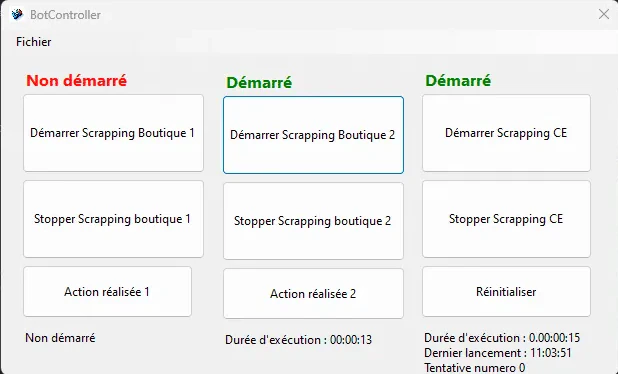
    Control window. Each watch starts and stops separately, with its status clearly displayed.
  • 02
    Three independent watches. Three targets followed in parallel, each with its own running time.
  • 03
    Automated browsing. Selenium drives Chrome without a graphical interface, in the background.
  • 04
    Reading the page. The availability shown is extracted from the page, as a visitor would read it.
  • 05
    Checks at regular intervals. The check repeats on its own, with no human action.
  • 06
    Retry on error. A page that does not respond triggers a new attempt, whose number is shown in the window.
  • 07
    Alerts. An e-mail and a text message as soon as a place becomes free, with the details of the availability.
  • 08
    Log. Every check is recorded, so that what happened can be traced and an anomaly spotted.
03/One screenOriginal screenshot, nothing to blur

One screen, actual size

The control window, as it was captured at the time. The monitored site does not appear in it; nothing is blurred.

The bot's control window: three watches, each with its start and stop buttons, its status, its running time and its last launch
Screen 01The control window, original screenshot: three watches, two started, one stopped.

Each watch starts and stops separately

Three targets are followed in parallel. For each one, the status is clearly displayed with its running time; the last one also shows its launch time and the number of the current attempt.

04/TechnologiesWhat we chose, and why

A .NET program that drives a real browser

The bot reads the same page as a visitor, through a browser driven by the program.

  • ProgramWindows application on .NET, with its control window.
  • BrowserSelenium WebDriver, which drives Chrome without a graphical interface, in the background.
  • ReadingAvailability extracted from the displayed page.
  • AlertsE-mail and text message, with the details of the availability.
  • RetryAutomatic new attempt on error, with a counter visible in the window.
  • TracesA detailed log of every check, to spot an anomaly.

What next

A check that someone repeats by hand all day long?

This bot replaced watching with an alert. Tell us about yours, and we will tell you what is feasible, with a timeline and a rough price.

Discuss your project

Reply within 24 working hours, from one of the two founders. Or by phone: +33 7 59 96 14 99.